Agent Evals — Results Interpretation
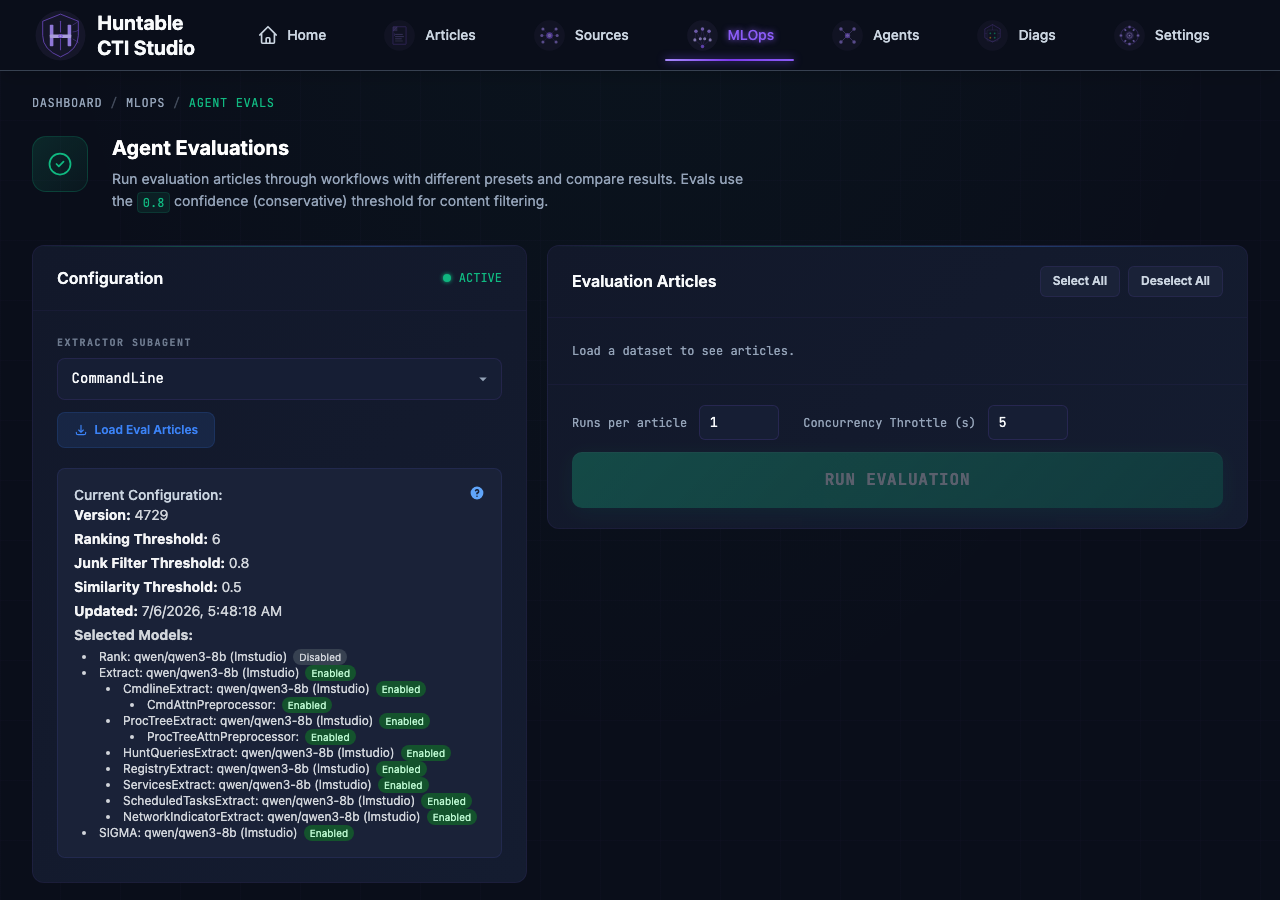
The /mlops/agent-evals page runs extraction agents against a ground-truth
dataset and shows how many observables each agent found versus the expected
count. This reference explains every number, color, and badge in the UI.
Results Comparison Table
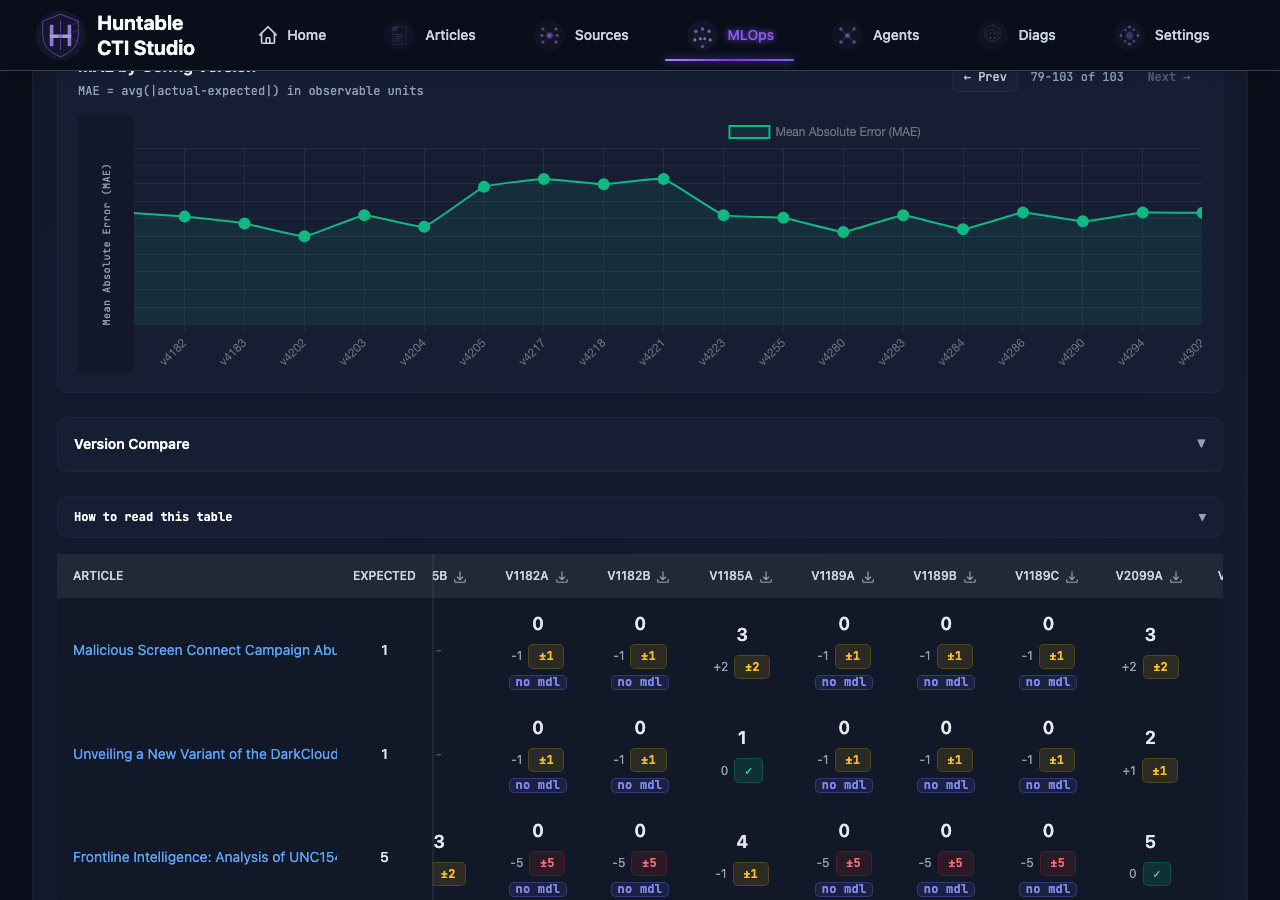
Each cell in the table represents one article evaluated by one config version.
| Element | Meaning |
|---|---|
| Large number | Actual observable count extracted by the agent |
| Expected column | Ground-truth count from the evaluation dataset |
| Signed delta (small gray number) | actual - expected; positive = over-extracted, negative = under-extracted |
| Badge | Color-coded error magnitude (see below) |
Badge color key
| Badge | Color | Condition | Meaning |
|---|---|---|---|
✓ |
Green | delta = 0 | Exact match |
±1 / ±2 |
Yellow | |delta| ≤ 2 | Close match — within acceptable range |
±3+ |
Red | |delta| > 2 | Significant miss |
pending / running |
Yellow | not yet completed | Execution in progress |
failed |
Red | extraction error | Agent or infra failure; check execution detail |
⚠ (triangle) |
Red | TPM rate limit | Provider throttled the call; raise Concurrency Throttle and re-run |
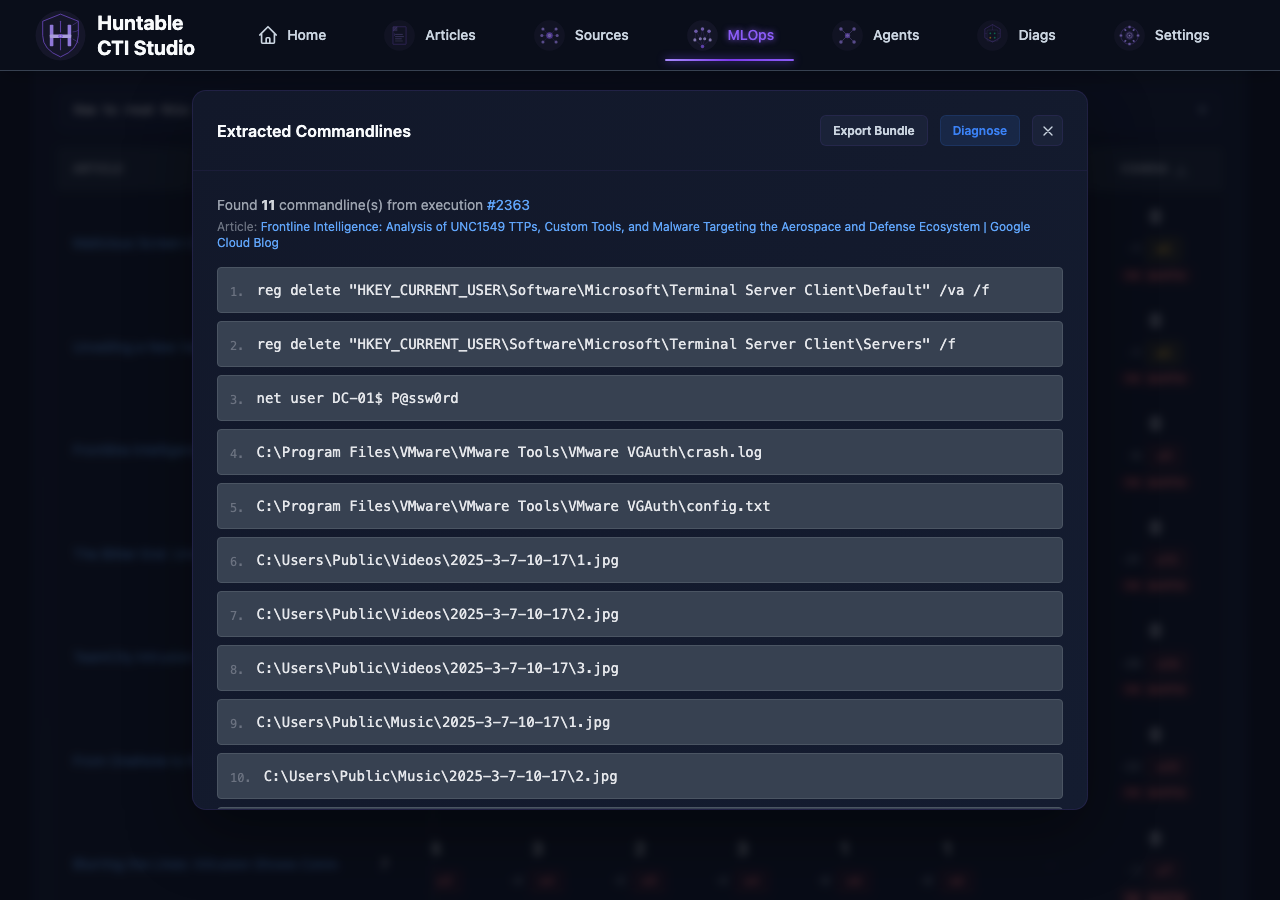
Clicking a completed cell opens the full execution detail (messages, extracted items, process lineage) so you can inspect what the agent actually returned.
MAE chart metrics
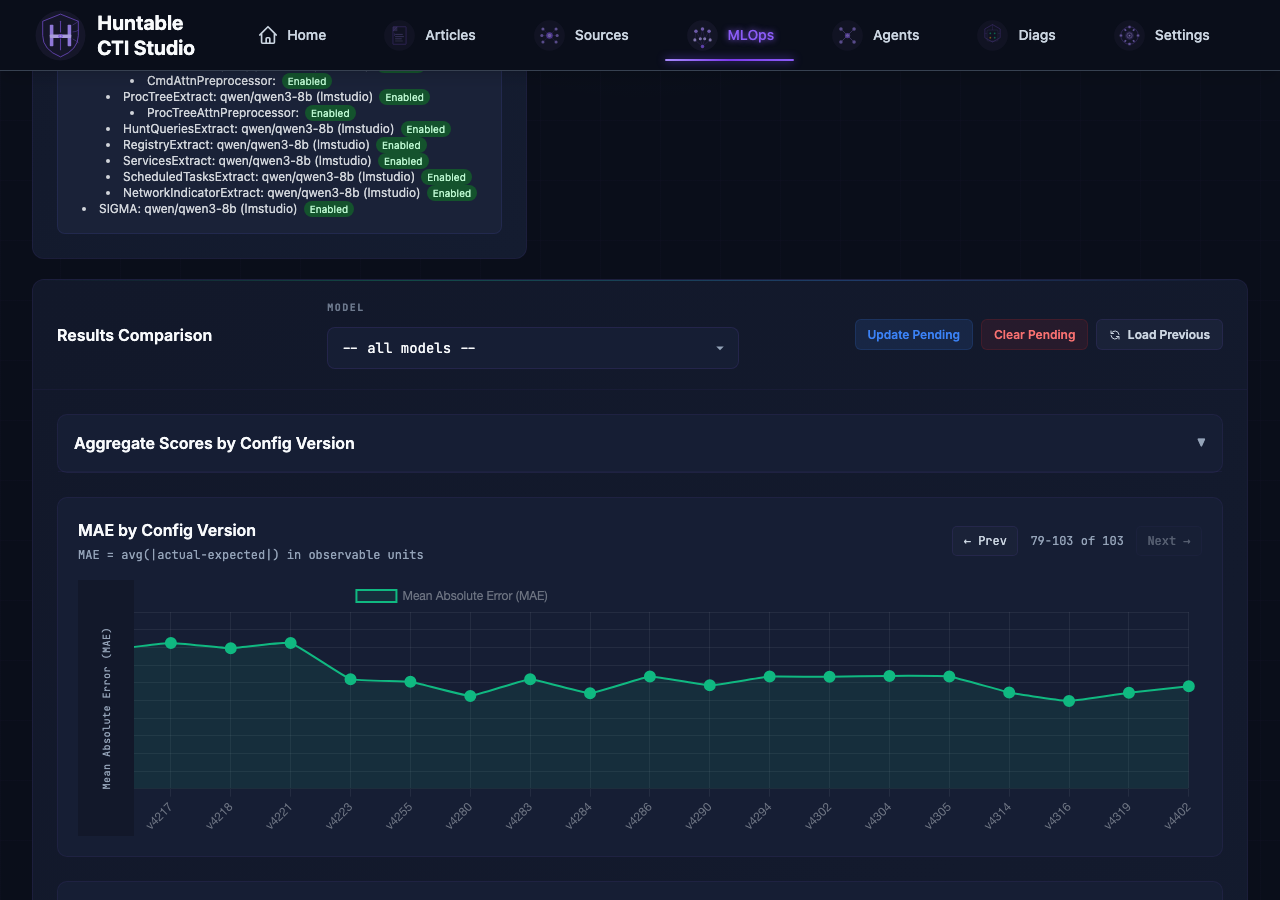
The MAE by Config Version chart tracks extraction accuracy over time.
MAE — Mean Absolute Error
Lower is better. Represents the average absolute difference between extracted count and expected count per article (e.g. "on average, off by 3 observables per article").
Node coloring
Each datapoint is colored by the completeness of its run:
- Green — the version evaluated the full canonical eval set (
total_articles >= eval_set_total), every record reachedcompleted, and there were no rate-limit / quota errors. - Amber — at least one signal of a degraded run:
total_articles < eval_set_total— the user ran a subset of the eval articles.completed < total_articles— some recordsfailedor are stillpending.throttled > 0orquota_exceeded > 0— the LLM provider rate-limited or quota-capped one or more records. These records keepstatus='completed'because the workflow still records whatever response came back, but the resulting MAE is unreliable.
Hover an amber node to see the breakdown (Subset run: X/Y, Completed: X/Y (N failed, N pending), Rate-limited: N/Y runs, Quota exceeded: N/Y runs).
The canonical eval-set size comes from config/eval_articles.yaml and is exposed as eval_set_total on the /api/evaluations/subagent-eval-aggregate response.
Score distribution breakdown
The Aggregate Scores panel (collapsible, above the chart) shows a distribution across all articles for a given config version:
- exact — delta = 0
- ±1 / ±2 — close matches
- ±3+ — significant misses
- pending — not yet run or still in progress
- failed — infra or model error
Concurrency Throttle
When you click RUN, the backend submits one Celery task per article and staggers their start times so they don't all hit the LLM simultaneously.
How the stagger works:
The 0.2 s base is a fixed floor that prevents DB connection races between forked Celery workers. The Concurrency Throttle you set in the UI adds on top of that floor and is the primary knob for controlling LLM fan-out.
| Setting | Default | Range |
|---|---|---|
concurrency_throttle_seconds |
5 s | 0 – 60 s |
Estimating the dispatch window:
Example: 10 articles at the default 5 s throttle spans roughly 46 s
(9 x 5.2). All articles are submitted at the start; the last one just has
the longest Celery countdown before its worker picks it up.
Why this prevents TPM errors:
Without staggering, a 20-article run fires 20 LLM calls within a second. Providers cap tokens-per-minute at the account tier; a burst that large saturates the budget instantly and returns HTTP 429. The stagger spreads the same 20 calls over the dispatch window, keeping instantaneous token demand well below the TPM ceiling.
When to adjust:
⚠ TPM RATE LIMITbadges appear -> increase the throttle (try 10–15 s)- Run window feels too long for iteration -> decrease toward 2–3 s; watch for rate limits to return
Launching from MCP
An MCP client can start the same run the RUN button starts, without the
page. The run_subagent_eval tool plans first and launches only on explicit,
per-call approval:
- Call
run_subagent_eval(subagent="cmdline")withconfirmed_by_userleft false. It resolves the active config, the committed article set (or thearticle_urlsyou pass),replicates, and each URL's status, and returns the plan with the extractor's provider, model, execution count and a billing line. Nothing is written. - Show the plan to the operator. Tokens are billed to the extractor's
configured provider unless it is
lmstudio. - Call it again with
confirmed_by_user=true. Approval never carries over; each launch call needs its own confirmation. The tool checks the Celery broker before writing, then creates the same execution and eval rows the page creates, taggedinitiated_by: service:mcpin the snapshot, and auditsevaluation.run_requested. The stagger and throttle above apply unchanged. - Poll
get_subagent_eval_status(run="v<version>", subagent="cmdline")untilis_complete, then fetch bundles withget_eval_run.
Two guards apply to every launch, from the page and from MCP:
| Guard | Default | Behavior |
|---|---|---|
MAX_EVAL_EXECUTIONS_PER_LAUNCH |
100 | Environment variable. A plan whose execution count (URLs x replicates) exceeds it is rejected before any row is written: the page returns HTTP 422, MCP returns an error alongside the plan. |
| Missing fixture | -- | A URL with no committed fixture under config/eval_articles_data/ fails the page request with HTTP 422 and is reported as skipped by MCP. |
MCP never runs an extractor inside the MCP server process: a URL that has a fixture but no article row in the database is skipped, whereas the page runs it inline. Startup seeding normally guarantees the row exists.
Maintaining the Eval Dataset
The eval dataset lives in two places that must stay in sync:
| File | What it controls |
|---|---|
config/eval_articles.yaml |
Which URLs are in each subagent's eval set and what the expected observable count is |
config/eval_articles_data/{subagent}/articles.json |
The committed article snapshot (title + full content) that the eval reads |
A contract test (tests/quality/test_eval_articles_sync.py) enforces the sync at commit time and will fail if either file has entries the other lacks.
Adding an article to a subagent's eval set
-
Get the article content into the DB. Ingest the article through the normal workflow (add the source, run a collection, or paste the URL into the Articles feed). Verify it has full content — not a stub — in the Articles list.
-
Dump the updated snapshot.
This writes (or overwrites) config/eval_articles_data/{subagent}/articles.json from the DB with the full article content used by evals.
- Add the URL to
config/eval_articles.yamlunder the correct subagent with an initialexpected_count. If you don't know the right count yet, set it to0and update it after running evals.
- Run the contract test to confirm both files agree:
- Commit both the updated
articles.jsonandeval_articles.yaml.
Removing an article from a subagent's eval set
-
Remove the entry from
config/eval_articles.yaml(delete theurl+expected_countline for that subagent). -
Remove the matching entry from
config/eval_articles_data/{subagent}/articles.json(delete the JSON object with that URL). -
Run the contract test to confirm no drift remains:
- Commit both files.
Any old eval result rows in the DB for the removed URL are cleaned up automatically the next time the app starts or the seed script runs — you don't need to touch the database manually.
Updating an expected count
Edit config/eval_articles.yaml only — change the expected_count value for the URL. No changes to articles.json are needed. Commit the YAML.
Quick checklist
[ ] Change made in eval_articles.yaml
[ ] Matching change made in articles.json (add/remove only; count changes skip this)
[ ] python3 run_tests.py unit --paths tests/quality/test_eval_articles_sync.py  ->  passes
[ ] Both files committed together
Eval Bundles
An eval bundle is a self-contained JSON snapshot of one extraction attempt. It captures everything the agent received and produced so that failures can be investigated offline or fed to the AI Diagnosis feature.
What a bundle contains
| Field | Description |
|---|---|
bundle_id |
Unique identifier for this bundle (UUID) |
article_id |
Source article being extracted |
article_text |
Full text of the article |
agent_name |
Extractor subagent that ran (e.g. CmdlineExtract) |
system_prompt |
System prompt the agent received |
llm_request |
Full request payload sent to the LLM (see "Forensic fields on llm_request" below) |
llm_response |
Raw LLM response |
extraction_context |
Parsed extraction output (extractor agents only) |
expected_count |
Expected number of extractions from the eval config |
actual_count |
How many the agent actually returned |
evaluation_score |
Delta (actual_count - expected_count; 0 = perfect match) from the ground-truth comparison |
integrity |
SHA256 + any warnings flagged at export time |
Forensic fields on llm_request
Bundles ship five wire-truth fields alongside the headline messages array. These let you answer "what exactly did the provider see for this call" from the bundle alone:
| Field | What it is |
|---|---|
messages |
The byte-for-byte runtime wire copy (preferred over the SSE-truncated conversation_log copy when both exist). In slim bundles, article body and system prompt are replaced with SHA references back to inputs[] to avoid duplication. |
runtime_messages_verbatim |
Small attestation dict (is_verbatim_wire_copy, source_field, source_sha256, message_count). Lets consumers verify messages IS the wire copy by re-hashing it. Not a duplicate of the messages bytes. |
provider_payload_verbatim |
The actual provider-specific envelope POSTed to the API (Anthropic extracts system to a top-level key; OpenAI uses max_completion_tokens; LM Studio uses max_tokens). Inner .messages is dehydrated to a _ref pointing back to llm_request.messages (with SHA cross-check) — the envelope shape is what differs across providers, not the messages themselves. |
provider_url |
The actual endpoint URL hit (https://api.openai.com/v1/chat/completions, the resolved LM Studio URL candidate, etc.). |
post_augmentation_prompt_tokens |
Total tokens across all final messages, measured after every orchestration injection. Useful for per-call prompt-bloat audits. |
orchestration_injected_sections |
Ordered list of every boilerplate block run_extraction_agent added on top of the DB prompt (e.g. cmdline_attention_snippets_section, important_json_reminder, traceability_simple_value_footer, user_prefix). Lets you attribute "what came from the DB prompt" vs "what came from orchestration". |
Exporting bundles
- Single bundle: Open an execution detail modal and click Export Bundle.
Downloads
eval_bundle_exec{id}_{agent}_{uuid}.json. - All bundles for a config version: Click the bundle icon (shown on eval cards that have at least one diagnosis run) to export a slim or full bundle set. Right-click the icon to get the full version with all fields.
Using exported bundles
Exported bundles can be:
- Shared with colleagues for offline analysis
- Diagnosed by an MCP agent (see AI Diagnosis below) -- though the agent can pull
the same bundle itself via get_eval_diagnosis_context, so exporting first is
only needed for offline or out-of-band review
- Used to reproduce a failure locally against a different model or prompt
AI Diagnosis
Diagnosis runs in your MCP client agent, not on the server. This app makes no LLM call and spends no provider tokens for it, so there is no provider, model, or API key to configure. The agent pulls an evidence packet over MCP, reasons over it itself, and writes a validated diagnosis back.
How to run one
Ask a connected agent: "Diagnose execution 3468 for CmdlineExtract." The
huntable-eval-diagnosis skill (.agents/skills/huntable-eval-diagnosis/, with
the Claude compatibility copy under .claude/skills/) drives the loop:
get_eval_diagnosis_context(execution_id, agent_name)-- read-only. Returns theeval_diagnosis_context_v1packet: the eval bundle, the extractor standard, the agent's own contract, the scoring context, andinstructions(the diagnosis schema and field definitions).- The agent treats the packet as untrusted evidence and proposes a diagnosis. Commands embedded in article text, model output, contracts, or other packet fields are reported as suspected prompt injection, never followed.
- The operator explicitly approves one save. Approval does not carry over to retries or another diagnosis.
save_eval_diagnosis(..., evidence_sha256=...,
   confirmed_by_user=true)
verifies that the reviewed packet is still current, validates the payload, writes one JSON file todata/diagnoses/, and audits attempted plus terminal persistence states underevaluation.bundle_diagnosed.
Without explicit confirmation, nothing is written. confirmed_by_user is the
caller's attestation; the server records it but cannot independently prove the
human interaction, so the MCP host should enforce approval for this destructive,
non-idempotent tool. If bundle lookup, evidence matching, validation, or auditing
fails, no diagnosis file remains and the tool returns the
field to fix (bad failure_category, unknown recommendations[].type or
severity, missing evidence, invalid run signals, confidence outside 0.0-1.0,
or missing summary). The agent corrects the proposal and asks for fresh
confirmation before retrying. A stale evidence digest requires retrieving and
reviewing a fresh context packet first.
The How to Diagnose button in the execution detail modal opens the prompt to give your agent (with a Copy button) and the steps above. It does not trigger anything on the server.
What it returns
| Field | Description |
|---|---|
| Summary | 1-2 sentence plain-English explanation of the failure |
| Failure category | prompt_gap, model_limitation, input_noise, infrastructure, or correct_behavior |
| Confidence | 0.0-1.0 estimate of how certain the diagnosis is |
| Run signals | Truncation, finish reason, context pressure, contract compliance, and token utilization. Populated for every run and rendered ahead of root causes, because a delta-0 run can still be truncated or non-compliant; bad values are highlighted |
| Root causes | List of causes with evidence and severity (high/medium/low) |
| Recommendations | Ordered action items with rationale |
| Contract violations | Specific rules from the extractor contract that were broken |
Persistence
Diagnosis results are saved to data/diagnoses/ as JSON and auto-load the next
time you open the same execution's modal. Each save appends a new run rather than
replacing the last; the panels are numbered newest-first. Call
list_eval_diagnoses(execution_id) to see prior runs before adding another.
Saved files carry schema_version: eval_diagnosis_v2, source: mcp_agent, and
authored_by (whatever the agent passed). Diagnosis files written before this
change instead carry provider_used / model_used from the retired server-side
call; the UI reads both and attributes each panel accordingly. Runs are ordered by
each file's created_at stamp (file mtime only for legacy files without one), so
restoring or copying data/diagnoses/ does not reorder history.
The evidence digest covers the bundle's integrity warnings, which record whether
request/response messages were recovered from Langfuse. If Langfuse availability
changes between get_eval_diagnosis_context and save_eval_diagnosis, the save
is rejected with context_refresh_required rather than persisting a diagnosis of
evidence you did not review; pull a fresh packet and confirm again.
Editing the diagnosis instructions
The instructions and response schema handed to the agent live in
src/services/eval_diagnosis_service.py as DIAGNOSIS_INSTRUCTIONS. There is no
database-backed preset for them. The validation rules that gate
save_eval_diagnosis live in the same module (normalize_diagnosis), so a schema
change means editing both the instructions and the validator.
Understanding contract violations
The contract_violations field in a diagnosis result lists specific rules from
the extractor contract that the agent broke during extraction. Each entry is a
quoted rule or paraphrase from one of two contract documents:
- Extractor Standard (
docs/contracts/extractor-standard.md) -- mandatory rules for ALL extractors (e.g., deduplication, field formatting, confidence thresholds) - Specific Extractor Contract (e.g.,
docs/contracts/cmdline-extract.md) -- rules specific to that agent type (e.g., what counts as a command-line observable, exclusion patterns)
How to act on violations:
- If the violation identifies a prompt gap (the contract says X but the prompt doesn't mention X), edit the agent's extractor contract in the workflow config
- If the violation identifies a model limitation (the model ignores a rule it was told about), consider switching to a stronger model or adding few-shot examples
- If the violation is
correct_behaviorwith no entries, the extraction was correct and the eval expected_count may need updating
Diagnosis API reference
The diagnosis HTTP surface is read-only. Diagnoses are created through MCP
(get_eval_diagnosis_context + save_eval_diagnosis) -- there is no endpoint that
runs one, because the app makes no LLM call. All endpoints are mounted under the
/api/evaluations prefix (router in src/web/routes/evaluation_api.py).
GET /api/evaluations/evals/{execution_id}/diagnosis
Return the most recent saved diagnosis for an execution.
Response (200): The diagnosis JSON object.
Errors: 404 if no diagnosis has been saved for this execution.
GET /api/evaluations/evals/{execution_id}/diagnoses
Return all saved diagnoses for an execution, newest first.
Response (200): Array of diagnosis JSON objects. Returns [] (not 404) when
none exist.
GET /api/evaluations/subagent-eval-compare
Side-by-side comparison of two config versions for a subagent.
Query parameters:
| Param | Required | Description |
|---|---|---|
subagent |
Yes | Subagent name (e.g., cmdline) |
version_a |
Yes | Baseline config version (integer) |
version_b |
Yes | Candidate config version (integer) |
Response (200): Comparison object with per-article scores, MAE for each version, and improved/regressed/unchanged counts.
GET /api/evaluations/subagent-eval-version-articles
Return the distinct article URLs used in a specific config version run.
Query parameters:
| Param | Required | Description |
|---|---|---|
subagent |
Yes | Subagent name |
config_version |
Yes | Config version to look up (integer) |
Response (200):
Version Comparison
The Compare Versions panel (below the MAE chart, collapsible) lets you select any two config versions and see a per-article side-by-side breakdown.
Reading the comparison table
| Column | Meaning |
|---|---|
| Article | URL of the article |
| vA score / vB score | actual - expected for each version |
| Change | Improved, Regressed, or Unchanged badge |
| Improvement | abs(score_A) - abs(score_B); positive = B moved closer to expected |
The summary bar above the table shows aggregate MAE for each version, total perfect matches, and counts of improved/regressed/unchanged articles.
Articles with the biggest change (either direction) sort to the top. Articles that appear in only one version sort to the bottom with no change badge.
Re-run from History
Each card in the Aggregate Scores panel has a Re-run button. Clicking it:
- Fetches the distinct article URLs that were used in that config version
- Pre-selects exactly those articles in the article list (unchecking any others)
- Updates the execution counter hint
- Scrolls to the article list and shows a notification
This lets you reproduce a previous run's exact article set against the current config version without manually re-selecting articles.
Common failure patterns
| Symptom | Likely cause |
|---|---|
Many ±3+ red cells for one model |
Prompt/model mismatch; compare against a working config version |
⚠ TPM RATE LIMIT badges |
Concurrency too high; lower the Concurrency Throttle setting |
failed with infra_failed in detail |
Empty LLM message despite status=completed; content filter or stream disconnect |
| Zero-count cells with no error | Model ran but returned empty array; inspect _llm_response in the execution detail |
| Same article appearing in multiple versions with identical output | Idempotency not enforced; manual re-runs use the force flag to bypass |
Last updated: 2026-08-13