Huntable CTI Studio — Brand & Style Guide¶
Handoff Document for Presentation / Pitch Deck Agents
Product: Huntable CTI Studio v7.8.0 "Europa"
Category: Cyber Threat Intelligence (CTI) ML/AI Workbench
Audience: Security Operations, Threat Hunters, Detection Engineers
Tone: Precision-tool. Operational. No hype. Quietly confident.
Visual Reference Assets¶
All assets are in docs/brand-assets/.
| File | Contents |
|---|---|
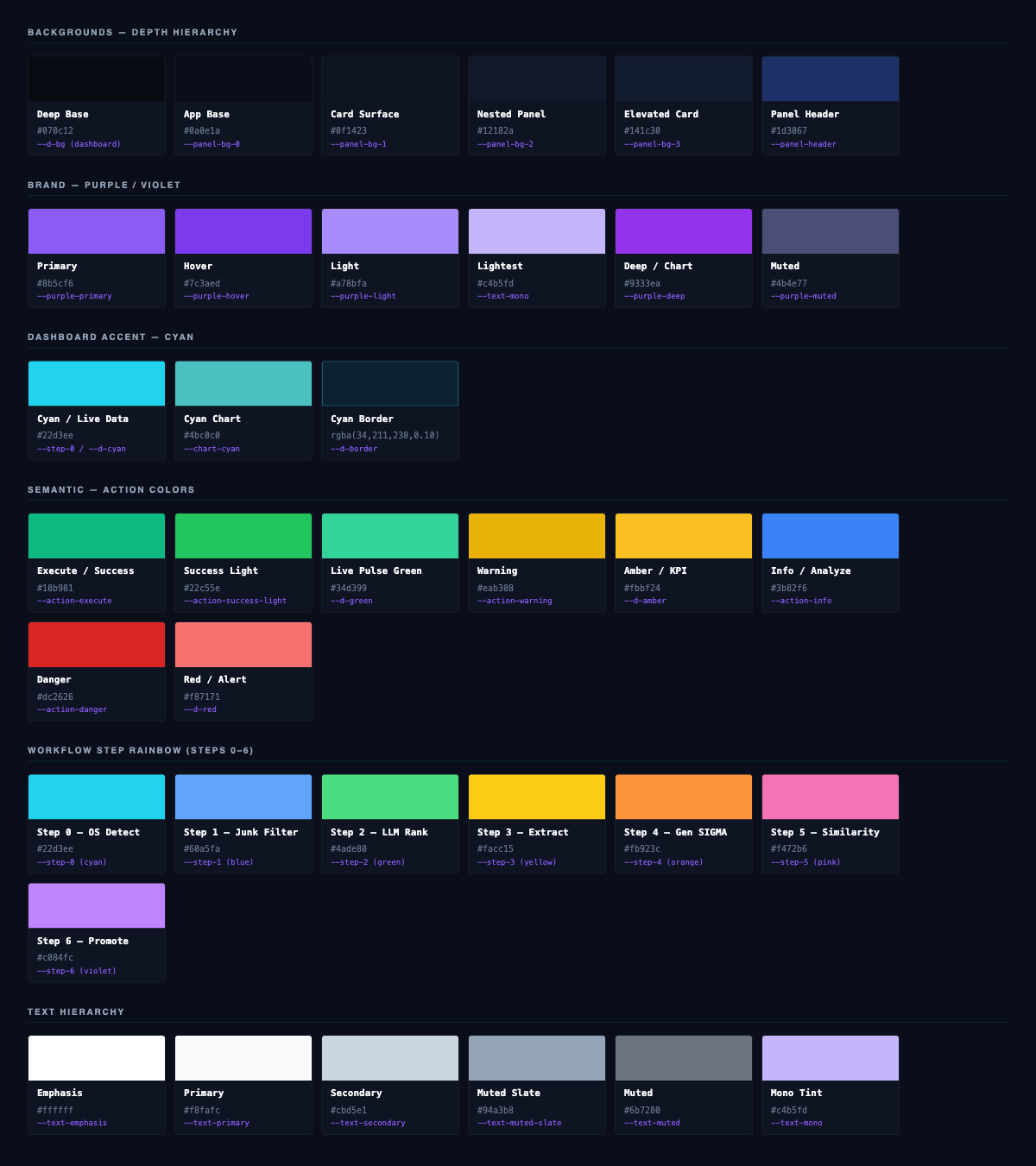
color-swatches.png |
Full color palette — all named tokens, organized by category |
logo-reference.png |
Logo mark on canonical dark background |
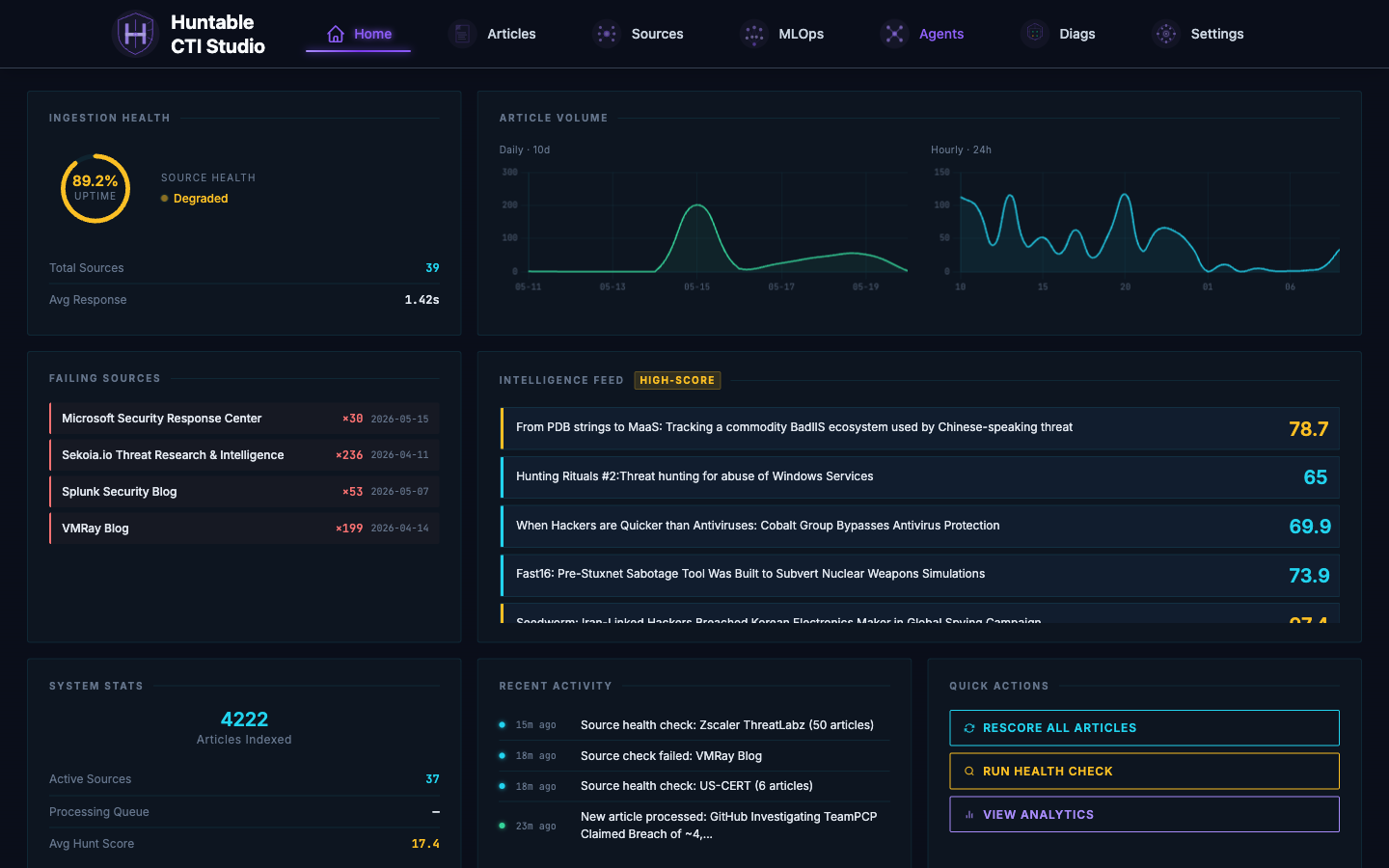
screen-dashboard.png |
Dashboard — intel cards, live metrics, nav bar |
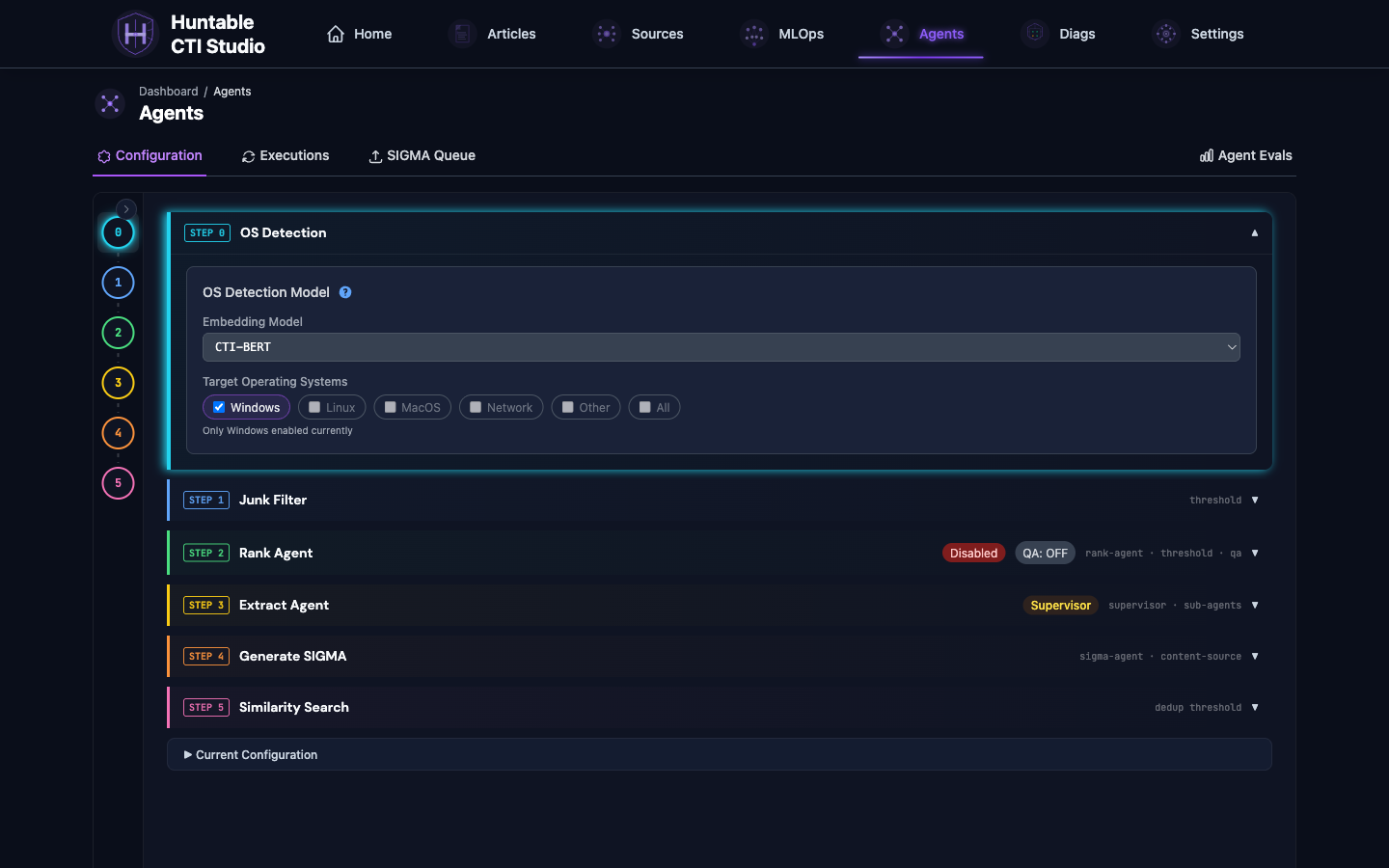
screen-workflow.png |
Agentic workflow — pipeline steps, config panels |
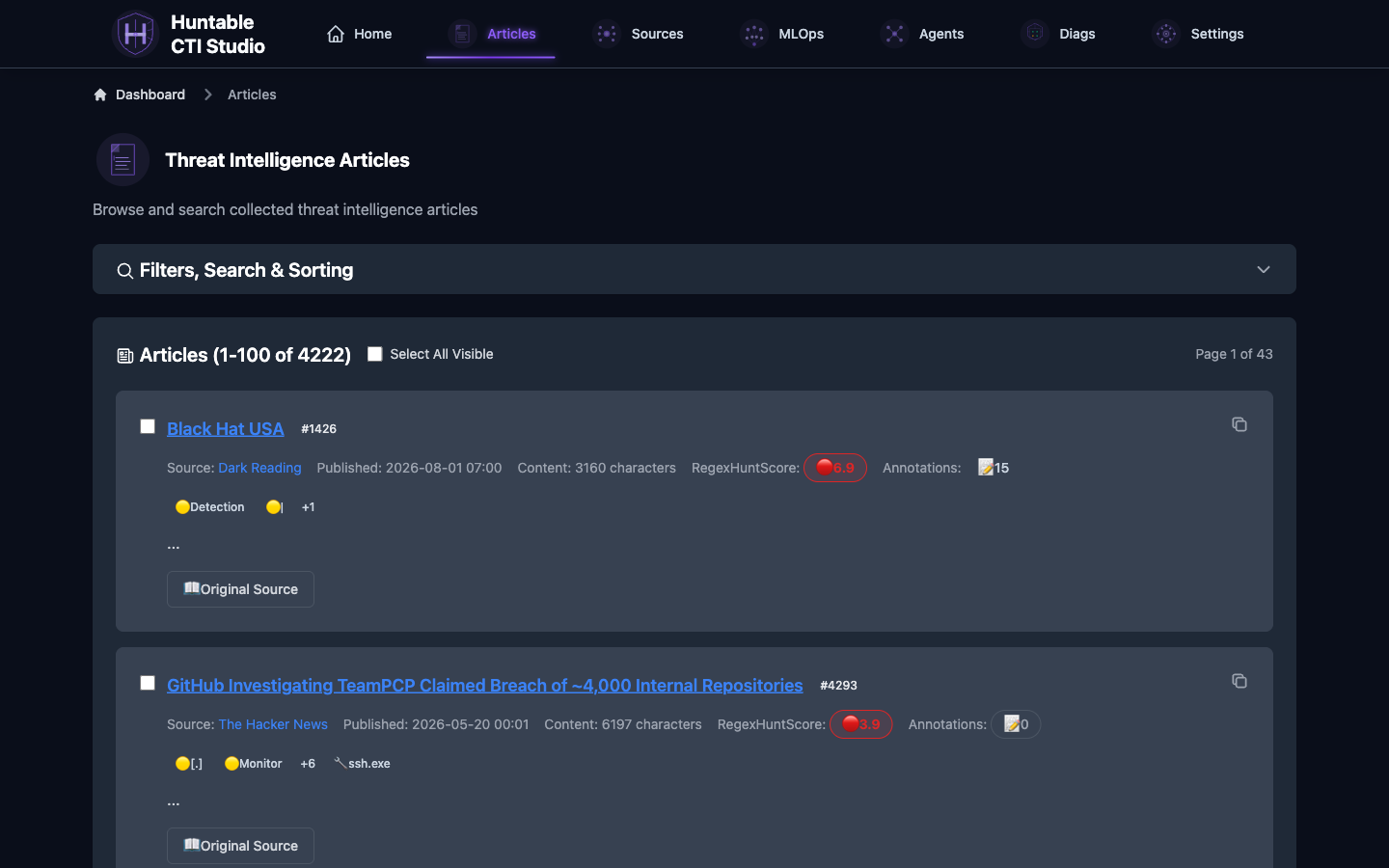
screen-articles.png |
Article list — data table, badges, filter UI |
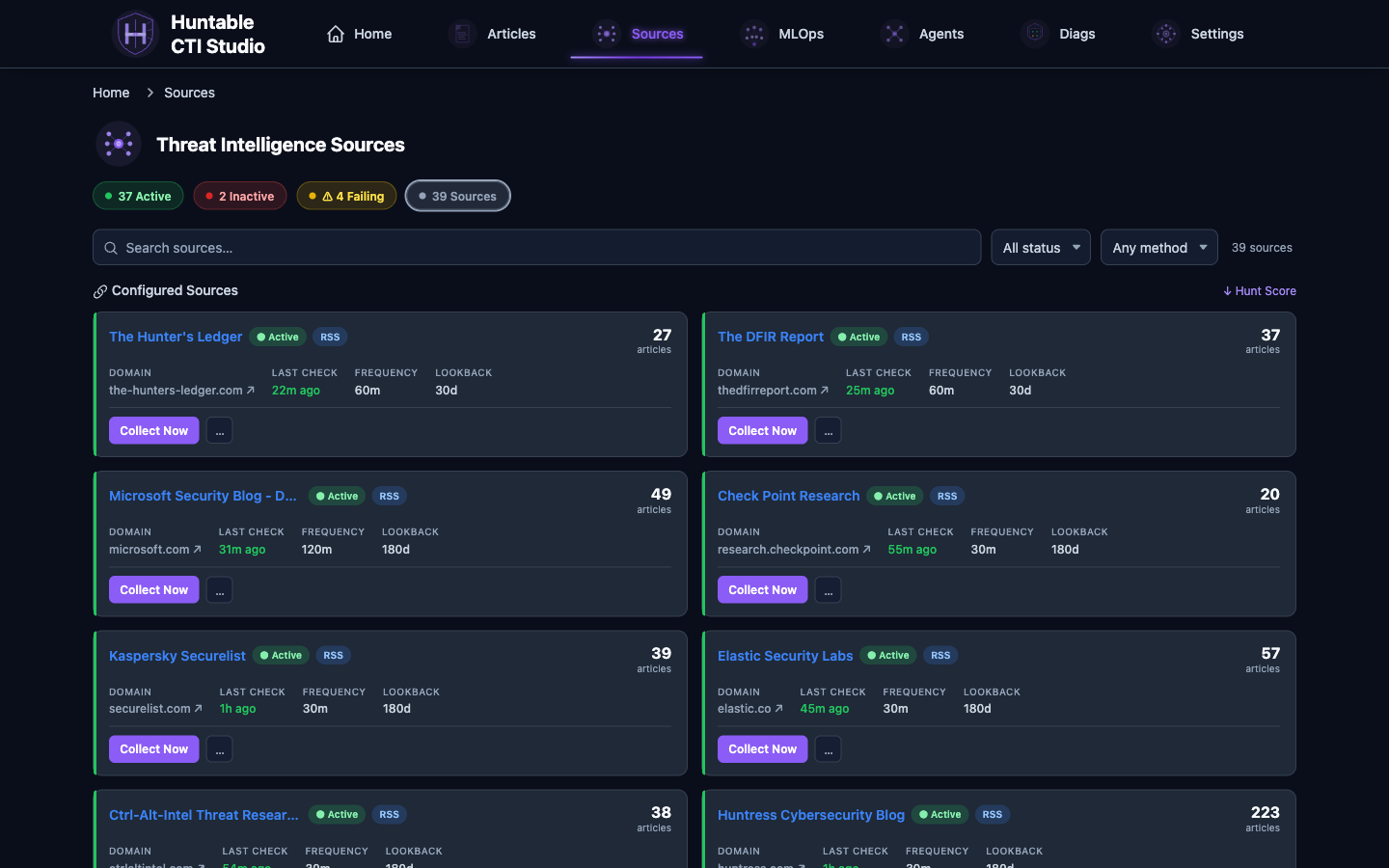
screen-sources.png |
Sources — status indicators, card grid |

1. Product Identity¶
What It Is¶
An end-to-end OSINT-to-SIGMA pipeline. Ingests threat intel from 38+ sources, uses LangGraph-orchestrated AI agents to score, extract observables, and generate detection rules; it then prevents duplicate Sigma rules via behavioral similarity search against 3,000+ community rules.
Tagline Territory¶
- "TTP → SIGMA. Automated."
- "From open-source intel to detection rule. Autonomous."
- "Hunt-ready intelligence, continuously."
Core Differentiators (slide content hooks)¶
- 7-step agentic workflow (Platform Detection → Junk Filter → Rank Agent → Extract Agent → Generate SIGMA → Similarity Search → Queue);platform-aware routing supports Windows, Linux, and macOS articles
- Multi-model AI: OpenAI, Anthropic, and Codex (deployment-managed ChatGPT subscription), plus optional local inference through LM Studio;no hard LM Studio dependency
- Deduplication at scale: Jaccard + behavioral similarity vs. 3,000+ Sigma community rules
- Source healing: operator-invoked diagnostics probe broken feeds (RSS, sitemap, JS rendering, WordPress JSON API) and propose a config fix for approval;never auto-applied
- MCP integration: Agents-native API for tool-using AI clients
2. Logo & Mark¶
Primary Logo¶
Shape: Shield outline with an "H" letterform, crosshair overlay, radiating data-flow lines.
Concept: Combines threat hunting (crosshair/target) with defense (shield) and identity (H letterform).
SVG Structure¶
- Background circle: #1a1a2e at 90% opacity
- Shield path: stroke #8B5CF6 (violet-500), no fill
- H verticals: #A78BFA (violet-400)
- H crossbar: #C4B5FD (violet-300) — lighter for hierarchy
- Crosshair lines: #8B5CF6 at 70% opacity
- Center target dot: outer #8B5CF6, inner #C4B5FD
- Data-flow arcs: #8B5CF6 at 50% opacity
Logo Usage in Presentations¶
- On dark backgrounds: Use full color SVG; shield renders with maximum contrast
- On light backgrounds: Avoid; the logo is dark-native. Use white text wordmark instead.
- Minimum size: 48×48px (scale viewBox 0 0 160 160)
- Clear space: ½ logo-width on all sides
- Wordmark: "Huntable" (bold) + "CTI Studio" (regular), stacked, in
--text-primary: #f8fafc
3. Color System¶
The app is dark-mode only. All colors are optimized for near-black backgrounds.
3.1 Background Depth Hierarchy¶
Use these as slide background layers (deepest → raised panels).
| Token | Hex | Use |
|---|---|---|
--panel-bg-0 |
#0a0e1a |
Slide background — deepest layer, near-black navy |
--panel-bg-1 |
#0f1423 |
Card / panel surface |
--panel-bg-2 |
#12182a |
Nested panel |
--panel-bg-3 |
#141c30 |
Elevated surface |
--panel-bg-4 |
#161e34 |
High emphasis card |
--panel-bg-5 |
#1a2238 |
Hover/active state |
--panel-bg-6 |
#1e2841 |
Top-layer floating elements |
--panel-header |
#1d3067 |
Section headers with blue-purple tint |
Slide tip: Background =
#0a0e1a. Content cards =#0f1423or#12182a. Use subtle1pxborders atrgba(255,255,255,0.06)to separate layers.
3.2 Brand Colors — Purple/Violet (PRIMARY)¶
Purple is the single dominant brand hue. Use it for CTAs, accents, active states, and logo elements.
| Token | Hex | Use |
|---|---|---|
--purple-primary |
#8B5CF6 |
Primary brand color — Tailwind violet-500 |
--purple-hover |
#7C3AED |
Hover / active states |
--purple-light |
#A78BFA |
Lighter accent, secondary highlights |
--purple-deep |
#9333EA |
Chart series, strong emphasis |
--purple-muted |
#4B4E77 |
Disabled / low-contrast elements |
--purple-bg-light |
#F3E8FF |
Light-mode pill backgrounds (rare) |
--purple-border-25 |
rgba(139,92,246,0.25) |
Subtle purple card borders |
--purple-glow |
rgba(122,79,255,0.9) |
Nav underline glow, active indicators |
--purple-text-shadow |
rgba(139,92,246,0.8) |
Active nav item text glow |
Slide tip: Use
#8B5CF6for section headers, data callouts, and all interactive elements. Use#A78BFAfor secondary text when emphasizing intel data. A thin2pxbottom border inlinear-gradient(90deg, #A78BFA, #7C3AED, #8B5CF6)mimics the app's active nav treatment.
3.3 Dashboard Accent — Cyan (SECONDARY ACCENT)¶
The dashboard uses cyan as its primary data-value color. Use sparingly for live metrics and quantitative callouts.
| Name | Hex | Use |
|---|---|---|
| Dashboard cyan | #22d3ee |
Big stat values, live indicators, "now" data |
| Dashboard muted border | rgba(34,211,238,0.10) |
Card borders on dark surface |
| Dashboard bright border | rgba(34,211,238,0.32) |
Hover card borders |
Slide tip: Reserve cyan for numeric KPIs on dark cards: articles processed, rules generated, sources monitored. It reads as "live telemetry."
3.4 Semantic Colors — Status & Action¶
| Role | Hex | Variable | Use in slides |
|---|---|---|---|
| Success/Execute | #10B981 (emerald-500) |
--action-execute |
Workflow step completions, positive metrics |
| Success dark | #059669 |
--action-execute-dark |
Hover/shadow pair |
| Warning | #EAB308 (yellow-500) |
--action-warning |
Partial results, degraded states |
| Info/Analyze | #3B82F6 (blue-500) |
--action-info |
Analyze actions, informational callouts |
| Danger | #DC2626 (red-600) |
--action-danger |
Failures, alerts, critical states |
| Green (chart) | #22C55E |
--action-success-light |
Chart lines, positive trend data |
3.5 Workflow Step Rainbow¶
The 7-step agentic pipeline has an explicit color sequence used for step indicators. Use this on workflow architecture slides.
| Step | Name | Hex |
|---|---|---|
| 0 | Platform Detection | #22d3ee (cyan) |
| 1 | Junk Filter | #60a5fa (blue) |
| 2 | LLM Rank | #4ade80 (green) |
| 3 | Extract Agent | #facc15 (yellow) |
| 4 | Generate SIGMA | #fb923c (orange) |
| 5 | Similarity Search | #f472b6 (pink) |
| 6 | Promote to Queue | #c084fc (violet) |
Slide tip: Use this rainbow as numbered pipeline step indicators on architecture slides. Each step gets its assigned color for its icon/dot/border.
3.6 Text Hierarchy¶
| Token | Hex | Use |
|---|---|---|
--text-emphasis |
#FFFFFF |
Slide headers, critical callouts |
--text-primary |
#F8FAFC |
Body text, card content |
--text-secondary |
#CBD5E1 |
Supporting text, nav labels |
--text-muted-slate |
#94A3B8 |
Captions, metadata |
--text-muted |
#6B7280 |
De-emphasized detail, timestamps |
--text-mono |
#C4B5FD |
Monospace data values (violet-tinted) |
3.7 Badge Colors (for status chips)¶
| State | Text | Background |
|---|---|---|
| Active/Success | #86efac |
rgba(34,197,94,0.2) |
| Warning | #fde047 |
rgba(234,179,8,0.2) |
| Error | #fca5a5 |
rgba(239,68,68,0.2) |
| Info | #93c5fd |
rgba(59,130,246,0.2) |
| Neutral | — | rgba(71,85,105,0.5) |
4. Typography¶
Font Stack¶
Three typefaces. All loaded from Google Fonts.
| Face | Weights | Role |
|---|---|---|
| Inter | 300, 400, 500, 600, 700, 800 | Primary UI — all labels, headings, body text |
| JetBrains Mono | 400, 600, 700 | Data / telemetry — metrics, counts, code, rule content |
| DM Sans | 400, 500, 600, 700 | Soft UI — available but less prominent; used for alt labels |
Type Scale (observed from app)¶
| Role | Font | Size | Weight | Letter-spacing | Case |
|---|---|---|---|---|---|
| Slide title / page header | Inter | 32–48px | 700–800 | -0.02em | Title |
| Section label / card title | Inter | 10px / 0.625rem | 700 | 0.18em | ALL CAPS |
| Body / card content | Inter | 12–14px / 0.75–0.875rem | 400–500 | normal | Sentence |
| Big KPI value | Inter | 20–24px / 1.25–1.5rem | 600 | -0.01em | — |
| Monospace data | JetBrains Mono | 12px / 0.75rem | 600 | normal | — |
| Fine print / timestamp | JetBrains Mono | 10px / 0.625rem | 400 | 0.1em | — |
Slide tip: Section dividers should use ALL CAPS Inter at ~10px with wide letter-spacing (0.18em) and a trailing horizontal rule in
rgba(34,211,238,0.10)— this is the exact card-title treatment from the dashboard.
5. Motion & Visual Effects¶
Signature Dashboard Effects¶
These define the "intelligence terminal" feel:
- Scanline texture —
repeating-linear-gradientofrgba(0,0,0,0.025)every 4px. Subtle depth for dark backgrounds. - Top-edge glow on hover —
linear-gradient(90deg, transparent 10%, #22d3ee 50%, transparent 90%)at 50% opacity; 1px high. Applied to card top edges. - Staggered card reveal — Cards animate in with
translateY(8px) → 0over 0.4s, each delayed 50ms. - Nav active underline —
linear-gradient(90deg, #A78BFA, #7C3AED, #8B5CF6)withbox-shadow: 0 0 8px rgba(122,79,255,0.9). - Live pulse dot — 7px green circle, pulsing
box-shadow: 0 0 6px #34d399at 2s period. Used for system health. - Interactive card — On hover: border transitions to
rgba(139,92,246,0.35)(purple). On active:translateY(1px).
6. UI Components (for slide mockups)¶
Cards / Panels¶
Background: #0f1423  (--panel-bg-1)
Border: 1px solid rgba(255,255,255,0.06)
Border-radius: 8px (cards) / 3px (dashboard intel-cards)
Padding: 20px 22px
Elevated card:
Background: #141c30
Border: 1px solid rgba(255,255,255,0.08)
Box-shadow: 0 1px 3px rgba(0,0,0,0.2)
Interactive card (hover state):
Buttons¶
| Button type | Background | Hover | Use |
|---|---|---|---|
| Analyze (blue) | #3B82F6 |
#2563EB |
Analyze / info actions |
| Manage (purple) | #8B5CF6 |
#7C3AED |
Primary brand CTA |
| Execute (emerald) | #10B981 |
#059669 |
Run / start actions |
| Danger (red) | #DC2626 |
#B91C1C |
Delete / stop |
| Workflow (muted purple) | #4B4E77 |
#7C3AED |
Secondary workflow actions |
Nav Bar¶
Background: #0a0e1a  (same as page bg — flat nav)
Border-bottom: 1px solid #374151
Height: 70px
Logo: 57×57px SVG
Nav links: Inter 14px 500, color #CBD5E1 default → #8B5CF6 active
Active indicator: 2px gradient bottom border + glow
Badges / Pills¶
Font: Inter 10px 600, letter-spacing 0.14em
Padding: 1px 5px
Border-radius: 2–3px
Style: semi-transparent bg + matching text + 1px border
Metric Rows (data tables)¶
Layout: flex, space-between
Label: Inter 12px 400, color #64748b
Value: JetBrains Mono 12px 600, color #e2e8f0
Value accent colors: cyan / amber / red / green per semantic meaning
Separator: 1px solid rgba(34,211,238,0.10)
7. Slide Layout Recommendations¶
Background Treatment¶
- Base:
#0a0e1aor#070c12(dashboard deepest) - Optional: Add scanline texture overlay at 2.5% opacity
- Optional: Subtle radial gradient from center —
radial-gradient(ellipse at 50% 0%, rgba(139,92,246,0.08), transparent 70%)
Slide Structure Pattern¶
┌──────────────────────────────────────────────────────┐
│  [SECTION LABEL] ─────────────────  10px Inter caps  │
│                                                       │
│  BIG HEADLINE IN WHITE                               │
│  Supporting line in #CBD5E1                          │
│                                                       │
│  ┌──────────┐  ┌──────────┐  ┌──────────┐           │
│  │  Card 1  │  │  Card 2  │  │  Card 3  │           │
│  │  #0f1423 │  │  #0f1423 │  │  #0f1423 │           │
│  └──────────┘  └──────────┘  └──────────┘           │
└──────────────────────────────────────────────────────┘
Color Usage Rules for Slides¶
- Purple = primary brand, CTAs, section accents — use freely
- Cyan = live/quantitative data only — numbers, metrics, counts
- Emerald = positive outcomes, successful pipeline steps
- Red = problems, blockers, "why this tool exists" pain points
- Amber/Yellow = caution, partial, in-progress
- White (
#F8FAFC) = headlines, critical callouts - Slate (
#94A3B8) = supporting detail, captions - Never mix more than 3 accent hues on a single slide
Architecture Diagram Style¶
For the 7-step pipeline diagram:
- Each step = colored circle/node using Step Color Rainbow (§3.5)
- Connectors = thin lines, rgba(148,163,184,0.4)
- Labels = Inter 11px, #CBD5E1
- Background = panel cards #0f1423 with subtle border
- Active/highlighted step = add glow box-shadow: 0 0 12px <step-color>
8. Voice & Tone for Slides¶
Language Register¶
- Precision over hype. Write like a senior threat hunter reviewing a tool, not a salesperson.
- Specific beats vague. "38 OSINT sources, 3,000+ Sigma rules indexed" not "comprehensive coverage."
- Active verbs. "Ingests. Scores. Extracts. Generates. Deduplicates." The pipeline verbs are the product story.
- Operator-first. Audience is SOC analysts and detection engineers. They respect specificity.
Avoid¶
- "Revolutionary" / "AI-powered" / "next-generation" (too marketing)
- Passive voice ("content is processed by…")
- More than 3 bullet points per slide
- Light backgrounds (the app is dark-native; slides should match)
Prefer¶
- Terminal-style monospace for any code, rule content, or data values
- Short, declarative slide titles (6 words max)
- One KPI callout per card, large, in cyan or purple
9. Quick Reference Cheatsheet¶
BACKGROUNDS          BRAND               SEMANTIC
──────────────────── ─────────────────── ───────────────────
#0a0e1a  base        #8B5CF6  primary    #10B981  success
#0f1423  card        #A78BFA  light      #EAB308  warning
#12182a  nested      #7C3AED  hover      #3B82F6  info
#141c30  elevated    #9333EA  deep       #DC2626  danger
#1d3067  header                          #22d3ee  cyan/live

TEXT                 FONTS
──────────────────── ───────────────────
#FFFFFF  emphasis    Inter (UI)
#F8FAFC  primary     JetBrains Mono (data)
#CBD5E1  secondary   DM Sans (alt)
#94A3B8  muted
#C4B5FD  mono-tint
Source: extracted from src/web/static/css/theme-variables.css and src/web/templates/base.html, dashboard.html. Last updated 2026-07-05.
Last reviewed: 2026-09-01